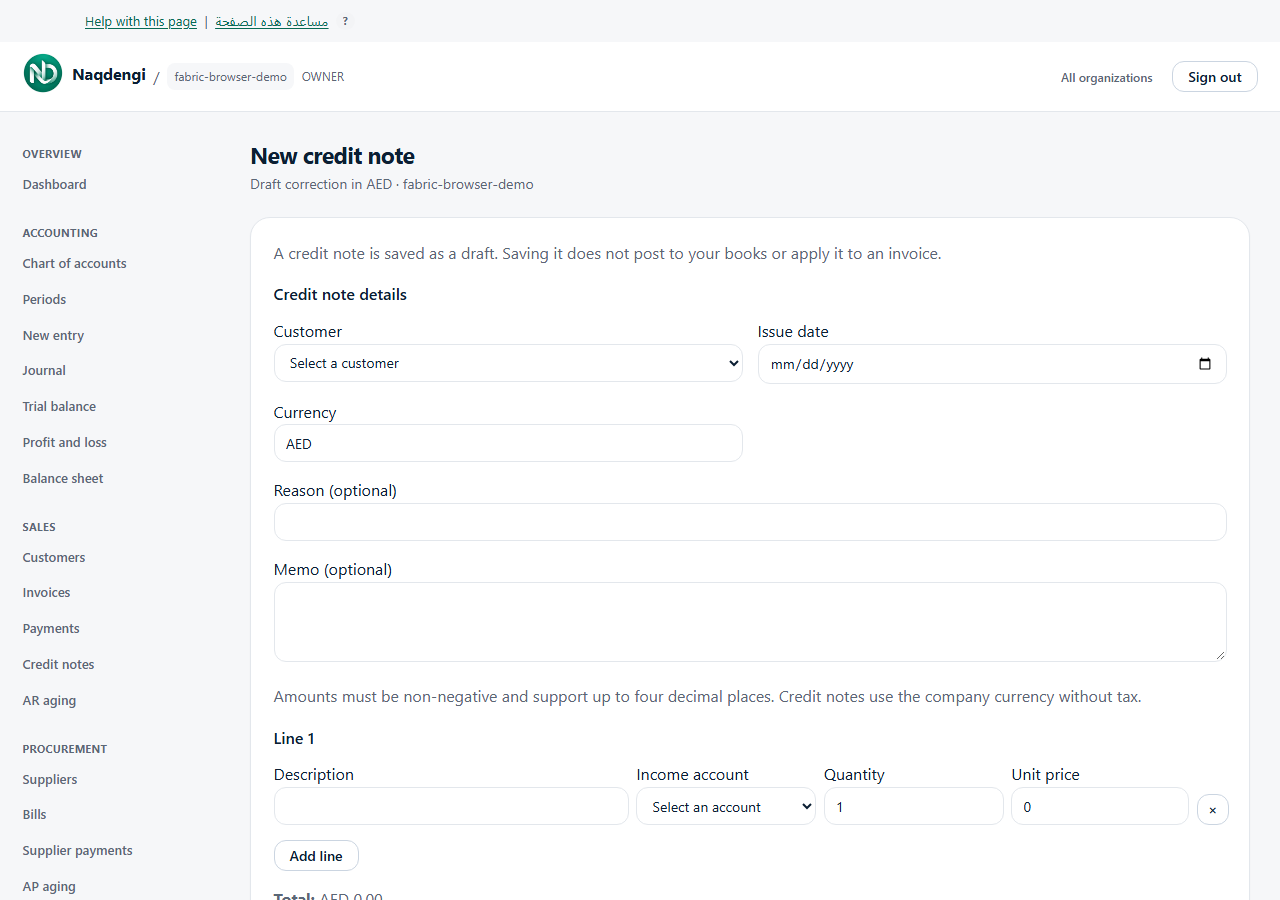
Save a draft credit note
Record a proposed customer credit without posting it or applying it to an invoice. Bookkeeper, Approver, Accountant, Admin and Owner can use this screen; Viewer cannot.
Steps
- Open Sales, then Credit Notes, then New credit note in the correct company.
- You need an active customer, an active income account and a configured company currency.
- Choose Customer and Issue date. Currency is read-only. Reason and Memo are optional.
- Enter Description, Income account, Quantity and Unit price for every line. Use Add line or remove lines, keeping between one and 100.
- Enter non-negative amounts with up to four decimal places. Check Total, then choose Save draft.
- Wait for Draft saved; it has not been issued. Choose Back to credit notes to review the list.
The list shows Number, Date, Total, Remaining and Status. Saving a draft does not change posted books or reduce an invoice balance.
Common problems
Check missing customer/account setup, invalid amounts, your role, session or subscription message. If the save outcome is uncertain, choose Review credit notes. The form blocks another save; inspect existing notes before starting another draft.
Not available
This screen has no issue, apply or expire controls. Saving the draft does not complete those actions.