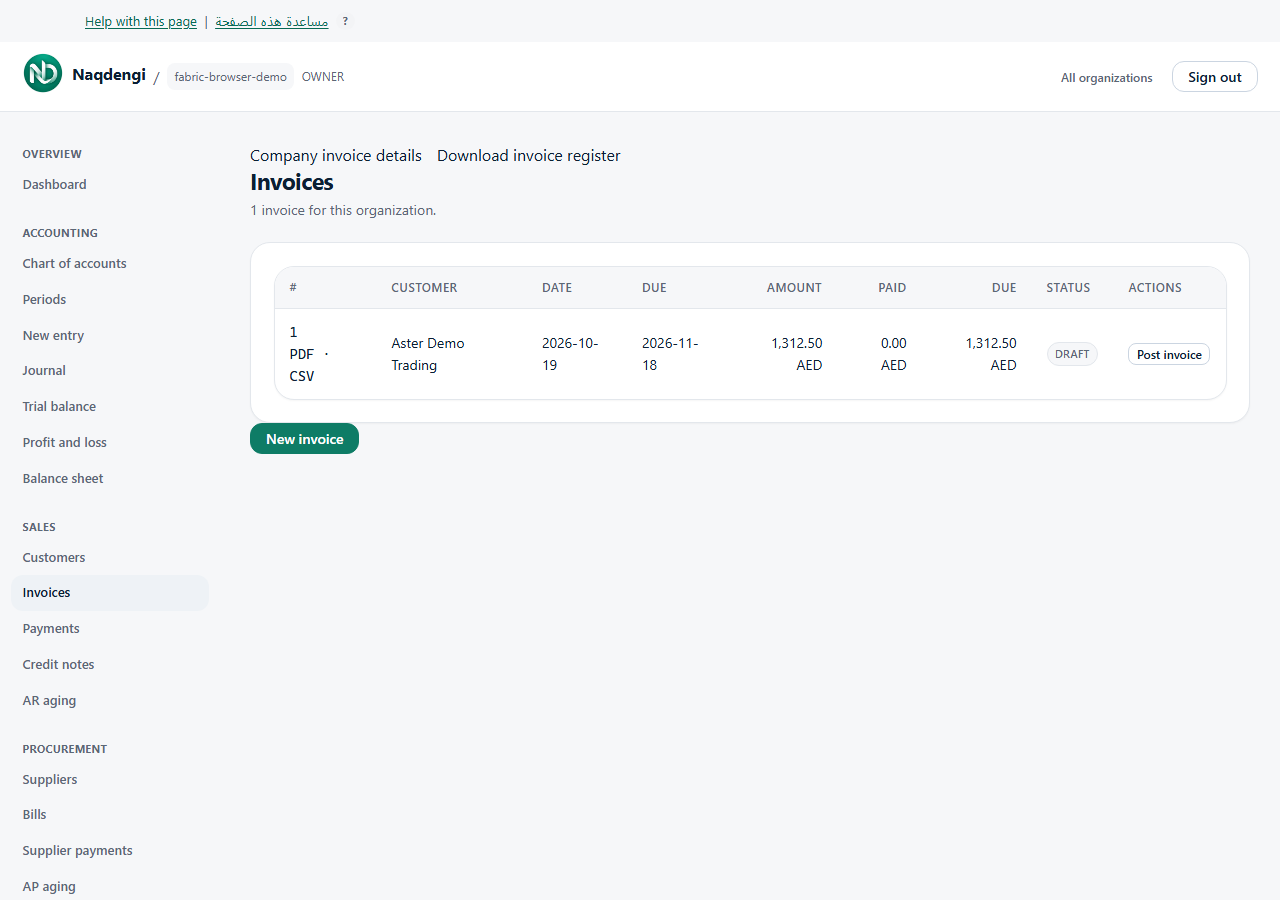
Download invoices as PDF or CSV
Keep a copy of an invoice, or download your company's invoice register for a spreadsheet.
Download one invoice
- Sign in, open your companies and choose the company you need.
- Open Sales, then Invoices. Find the invoice in the list.
- Choose PDF or CSV beside its invoice number. Your browser downloads the file.
Download the invoice register
On the Invoices page, choose Download invoice register. This downloads a CSV file containing invoice numbers, customers, dates, currencies, totals, amounts paid, amounts due and statuses.
Each invoice keeps its own currency. The register does not add different currencies together. Draft invoices are marked DRAFT.
What happens to your books
Downloading a file does not post an invoice, record a payment or change a stored amount. The export reflects the invoice's recorded figures.
If a download does not work
- Not signed in: sign in again, then return to the company's Invoices page.
- No access: ask your company owner to check your role. Bookkeepers and higher roles can read invoices; the Viewer role cannot export them.
- Too large: a register supports up to 1,000 invoices. One invoice export supports up to 1,000 lines. Contact support if you need a larger export.
- Wrong company: return to your companies and choose the correct company before downloading.
What is not available yet
These downloads do not send invoices by email, create a bulk PDF archive or submit documents to a tax authority. Registers above the stated limit are refused rather than silently truncated.