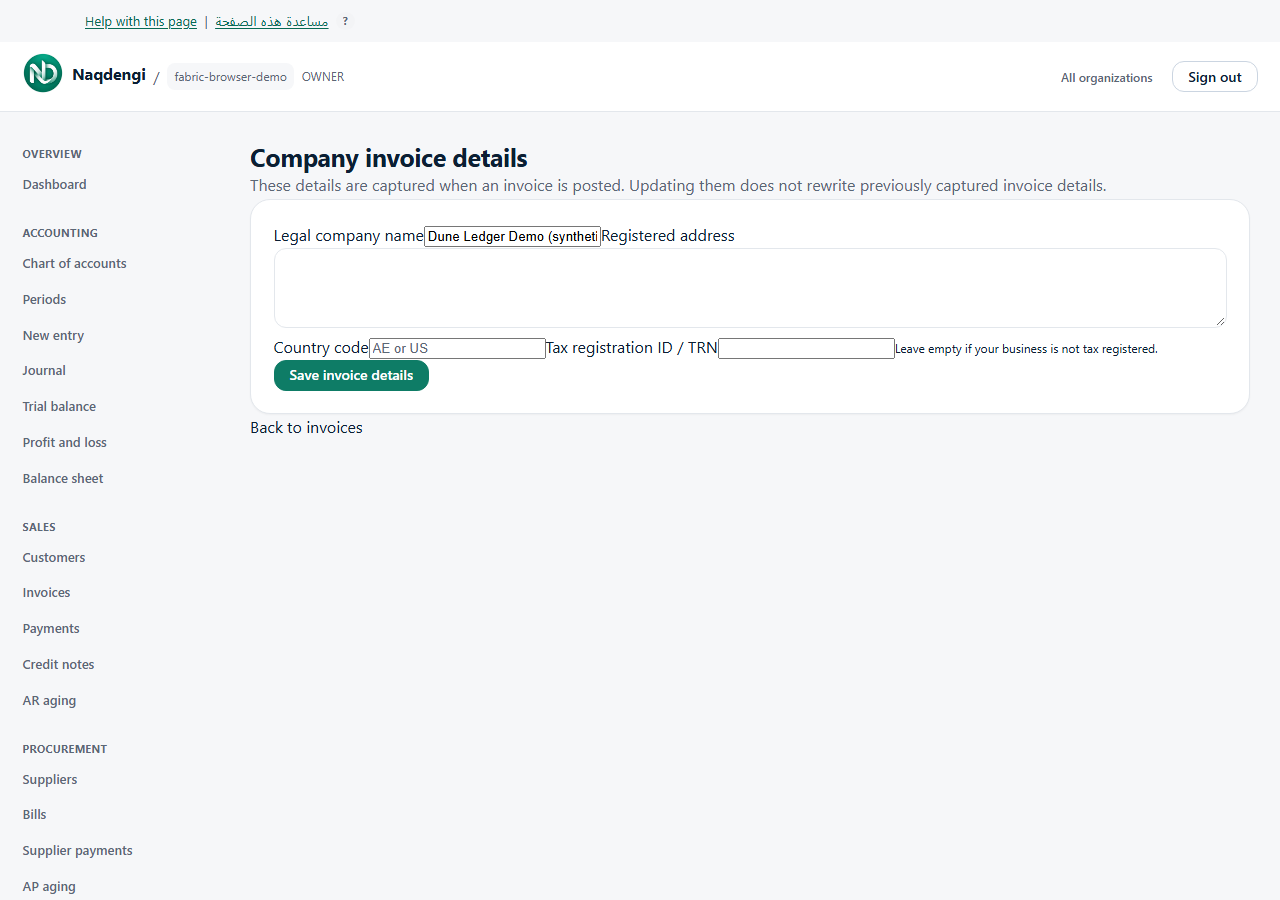
Set company invoice details
Only Owner can edit company invoice details. Admin, Accountant, Approver, Bookkeeper and Viewer cannot. These details are captured when an invoice is posted; updates do not rewrite previously captured invoice details.
Steps
- Choose the correct company and open Invoices, then Company invoice details. Owner can also use Invoice details under Admin.
- Enter Legal company name, required, up to 200 characters.
- Enter Registered address, required, up to 2,000 characters.
- Enter the two-letter Country code, such as AE or US.
- Enter Tax registration ID / TRN if applicable, up to 50 characters. Leave it blank if your business is not tax registered.
- Choose Save invoice details and wait for Company invoice details saved.
Common problems
For Country code AE, a non-empty TRN must contain exactly 15 digits. This describes the application's input validation; use your business records rather than treating the check as tax or legal advice.
For session, access, invalid-field or connection errors, check the company, Owner role and entered values. After an uncertain save, review the saved fields before repeating it. Existing posted invoices keep their captured details.
Not available
This form has no logo upload, template designer, bank-account, VAT-rate or email-delivery controls.