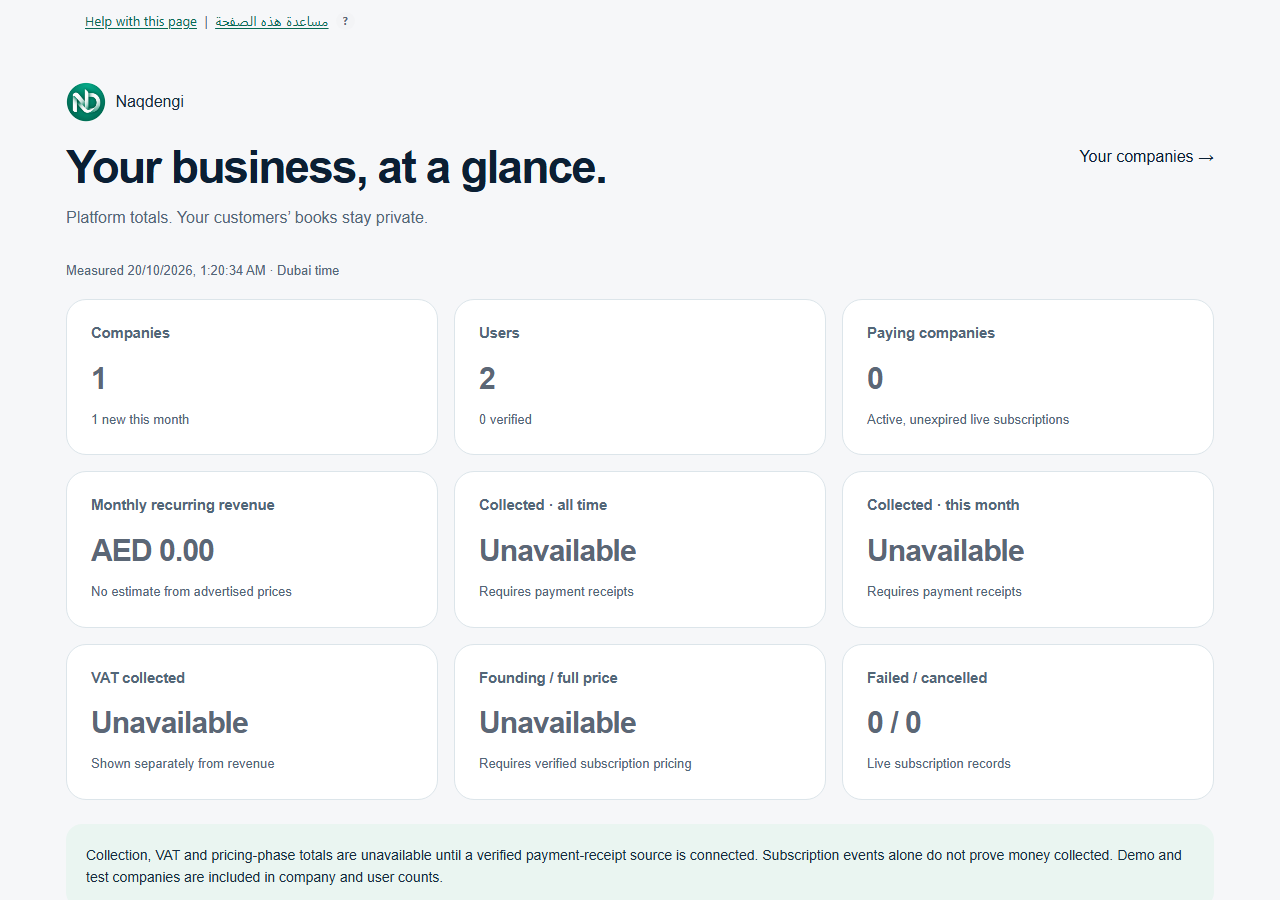
Owner Console read-only platform overview
Purpose
The Owner Console is a restricted read-only platform overview for the configured platform owner. This is different from the company OWNER role. Normal company owners and admins cannot grant access through Members.
The configured owner opens /platform and signs in with the pre-authorized account. If the page shows Sign in again to continue, choose Sign in again and sign in normally, preserving the destination /platform. The console requires a sign-in within the last 15 minutes. Regular session renewal is not a fresh sign-in.
Read Your business, at a glance. Platform totals show Companies, Users with a verified count, Paying companies meaning active unexpired live subscriptions, and Failed or cancelled. The measured timestamp uses Dubai time. Company and user counts include test and demo records. Do not interpret counts as paying customers.
Monetary tiles such as Monthly recurring revenue, Collected all time, Collected this month, VAT collected, and Founding or full price can be Unavailable. These totals are unavailable until verified receipt or pricing sources are connected. Do not estimate from advertised rates or claim that a provider event proves money collected.
The Companies table shows up to 200 latest company metadata entries: Company, Created, Plan status, Last activity shown as Not recorded when absent, plus showing N of total. The Your companies link returns to /organizations. No customer books or invoice content is exposed in this console.
Steps
- Open /platform.
- Sign in with the pre-authorized account.
- If prompted, select Sign in again to preserve the /platform destination.
- Review the platform totals and timestamp.
- Check the Companies table for company metadata.
- Use Your companies to return to /organizations if needed.
Common errors
- Not found: Access is unavailable. Do not guess owner accounts or repeat login attempts.
- Stale sign-in: Choose Sign in again and complete a normal sign-in. There is no bypass.
- Unavailable monetary values: This indicates an evidence or source gap. It is not zero.
Limits
The console is read-only. There is no impersonation, edits, refunds, charges, subscription override, user password reset, or viewing of private customer books. Refresh, export and filter controls are not provided here.