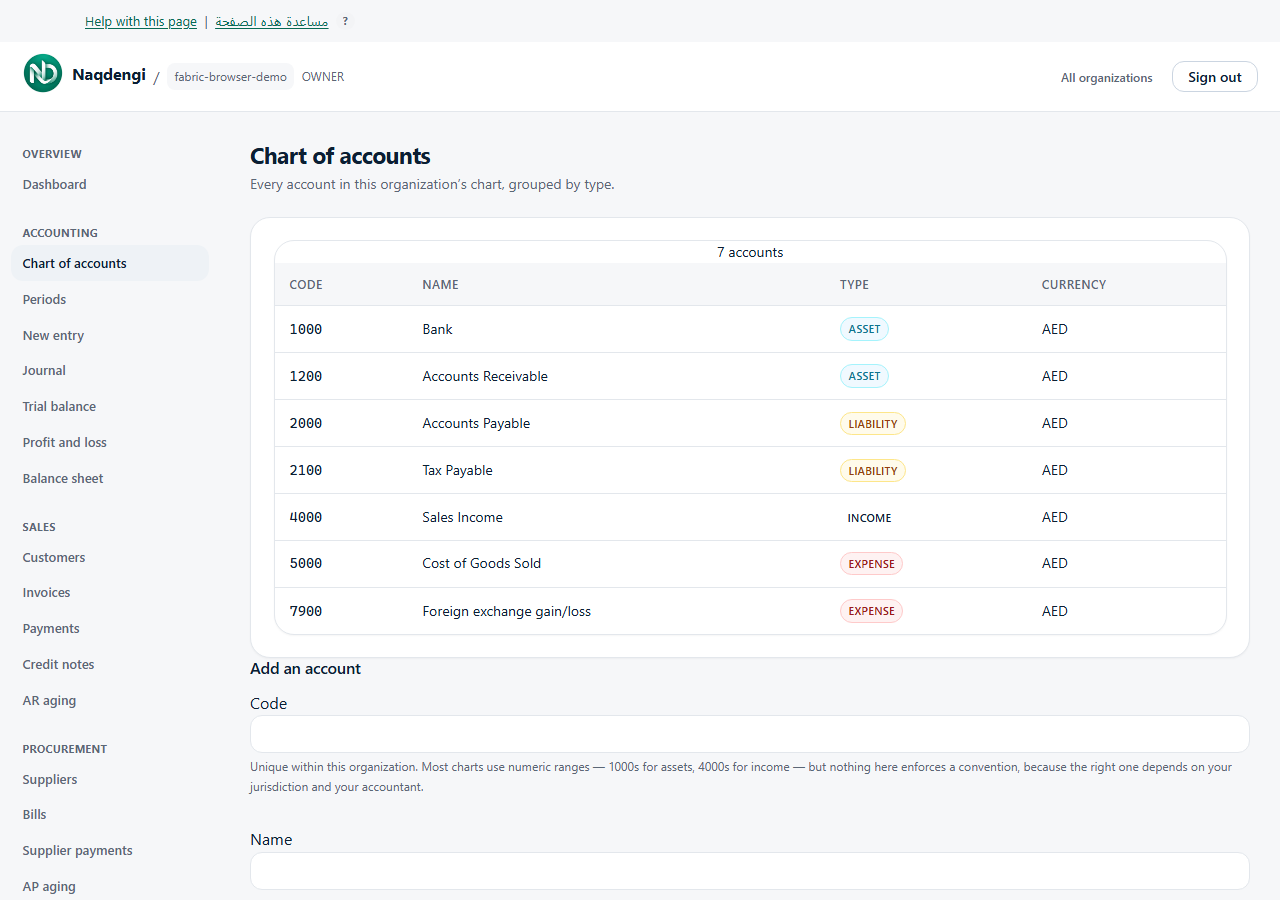
Manage chart of accounts
View and add accounts used by your company’s financial reports. New companies receive a minimal initial chart; review it before adding accounts.
Steps
- Open your company and go to Chart of accounts. The list shows Code, Name, Type, and Currency, grouped by ASSET, LIABILITY, EQUITY, INCOME, and EXPENSE, and sorted by code within each type.
- VIEWER can read the list. BOOKKEEPER or above can create accounts.
- Select Add an account. Enter a Code unique within this company and a Name, then select a Type from ASSET, LIABILITY, EQUITY, INCOME, or EXPENSE.
- Enter a three-letter Currency, which starts as the company base currency. Choose Add account. A successful save reloads the list.
- Choose the type carefully because it affects financial reports. There is no edit, delete, or type-change control on this page.
Common errors
- Code is already used: choose a unique code.
- Not allowed: ask a user with BOOKKEEPER or higher to create the account.
- Organization not found: reload, sign in, and check your company.
- Check code/name/type/currency: correct those fields and try again.
- Network failure is not proof the account was saved; inspect the list before retrying.
Limits
- No chart import or bulk editing. Numeric code ranges are not enforced. Check the three-letter currency code carefully; this screen does not validate it against a complete currency list.
- No edit or delete control. Creation writes may be refused by subscription state.