Create and post an invoice
Prepare a sales invoice as a draft, then post it separately. Bookkeeper, Approver, Accountant, Admin and Owner can use invoices; Viewer cannot.
Steps
- Choose your company, then open Sales, then Invoices. Choose New invoice.
- You need an active customer, active accounts and an open accounting period. Choose Customer and Period.
- Enter Invoice Date, Date of supply and Due Date. Notes are optional.
- Complete each line's Description, Qty, Price and Account. Use + Add line for more lines; keep at least one. Amounts must be non-negative with up to four decimal places.
- Check Total, then choose Create invoice. Return using Back to invoices; the saved invoice is DRAFT.
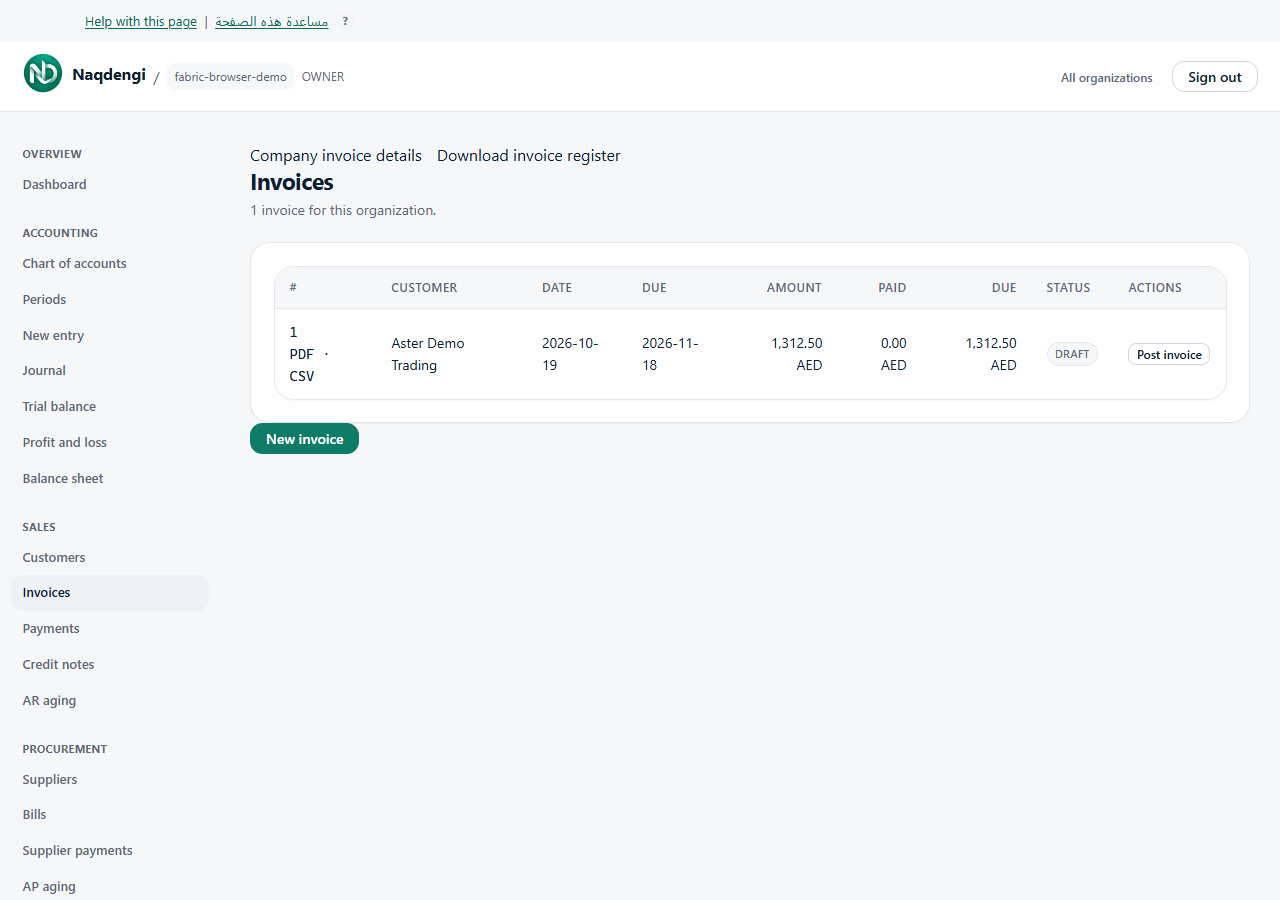
- After checking its dates and the open period, choose Post invoice beside the draft. Posting changes the books and is separate from saving.
The list shows amounts, paid amounts, amounts due and status. PDF, CSV and register downloads are covered in the invoice-download guide. Owner can also open Company invoice details.
Common problems
Check missing setup, dates, amounts, your role and session. After an uncertain save or posting result, check the list before repeating the action.
Not available
This screen has no email-send, recurring invoice, online collection, edit or cancel controls.